Using NHamcrest with NUnit or XUnit

NHamcrest is supported out of the box with MbUnit, but there’s nothing stopping you using it with any other framework.

You just need to write the shim code, i.e. Assert.That.

For example, with NUnit it would look something like this:

public static void That<T>(T actual, IMatcher<T> matcher, string message, params object[] args)
{
	if (matcher.Matches(actual))
		return;
	
	var writer = new TextMessageWriter(message, args);

	WriteExpected(matcher, writer);

	WriteActual(actual, matcher, writer);

	throw new AssertionException(writer.ToString());
}

private static void WriteExpected(ISelfDescribing matcher, TextWriter writer)
{
	writer.Write(TextMessageWriter.Pfx_Expected);
	var description = new StringDescription();
	matcher.DescribeTo(description);
	writer.Write(description.ToString());
	writer.WriteLine();
}

private static void WriteActual<T>(T actual, IMatcher<T> matcher, TextWriter writer)
{
	writer.Write("  But ");
	var mismatchDescription = new StringDescription();
	matcher.DescribeMismatch(actual, mismatchDescription);
	writer.Write(mismatchDescription.ToString());
	writer.WriteLine();
}

For XUnit:

public static void That<T>(T actual, IMatcher<T> matcher)
{
	if (matcher.Matches(actual))
		return;

	var description = new StringDescription();
	matcher.DescribeTo(description);

	var mismatchDescription = new StringDescription();
	matcher.DescribeMismatch(actual, mismatchDescription);

	throw new MatchException(description.ToString(), mismatchDescription.ToString(), null);
}

public class MatchException : AssertActualExpectedException
{
	public MatchException(object expected, object actual, string userMessage) : base(expected, actual, userMessage)
	{
	}
}

And, for completeness, here’s the MbUnit version:

        public static void That<T>(T item, IMatcher<T> matcher, string messageFormat, params object[] messageArgs)
        {
            AssertionHelper.Verify(() =>
            {
                if (matcher.Matches(item))
                    return null;

                var description = new StringDescription();
                var mismatchDescription = new StringDescription();

                matcher.DescribeTo(description);
                matcher.DescribeMismatch(item, mismatchDescription);

                return new AssertionFailureBuilder("Expected " + description)
                    .SetMessage(messageFormat, messageArgs)
                    .AddLabeledValue("Expected", description.ToString())
                    .AddLabeledValue("But", mismatchDescription.ToString())
                    .ToAssertionFailure();
            });           
        }

Debugging a R# unit test runner

Debugging a R# test runner is, thankfully, not an experience most people will have to go through.

Because ReSharper runs unit tests in a separate process, spun up on demand, you need to find some way to attach to this process.

The brute force approach is simply to throw an exception somewhere in your plugin, and then attach.

A better alternative is to launch VS in ReSharper.Internal mode (or “god mode”, as some like to refer to it) by supplying the /ReSharper.Internal argument to devenv.exe. (You can also enable a specific plugin by using /ReSharper.Plugin “MyPlugin.dll”, which spares some of the pain when trying to build a plugin that is in use).

This provides you with some extra options. The one you want is “Enable Debug (Internal)” which can be found in ReSharper->Options->Tools->Unit Testing:

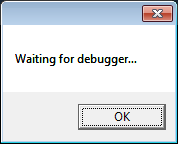
Once this is enabled, when you run a test a dialog will appear:

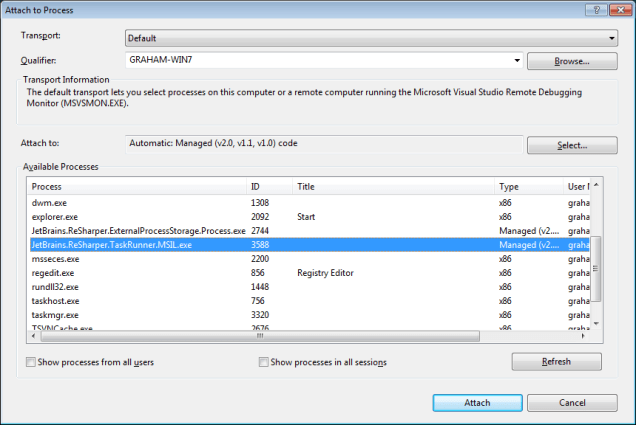
Giving you time to attach to the test runner:

Using named instances as constructor arguments

I’ve previously discussed the usefulness of StructureMap’s named instances, as well as bemoaning how fugly the syntax is for using them:

For<IUserRepository>()
    .Ctor<ISession>("session").Use(c => c.GetInstance<ISession>("UserDB"));

I submitted a pull request to improve it, but the other day I realised I could fix it in the current version with an extension method:

public static class StructureMapExtensions
{
    public static SmartInstance<T> Named<T, CTORTYPE>(this SmartInstance<T>.DependencyExpression<CTORTYPE> instance, string name)
    {
        return instance.Is(c => c.GetInstance<CTORTYPE>(name));
    }
}

Which means you can say:

For<IUserRepository>()
    .Ctor<ISession>("session").Named("UserDB");

Yay!

The downside of SystemTime

I’ve always been a fan of the elegance of Ayende’s SystemTime approach to dealing with time in tests. Unfortunately, I’ve recently re-discovered the problems that come with using globals.

I had a dependency on two different projects, each of which declared their own instance of SystemTime. Not insurmountable, as they were namespaced, but annoying and confusing nonetheless.

So from now on, for me, the new One True Way is just to pass in a Func<DateTime> as a constructor dependency:

public class Frobulator
{
    public Frobulator(Func<DateTime> currentTime)
    {
        this.currentTime = currentTime;
    }

    public DateTime Frobulate()
    {
        return currentTime();
    }
}

[TestFixture]
public class FrobulatorTests
{
    [Test]
    public void Frobulator_should_use_current_time()
    {
        var juanRodriguezCabrilloDiscoversCaliforniaAtSanDiegoBay = new DateTime(1542, 9, 28);
        var frobulator = new Frobulator(() => juanRodriguezCabrilloDiscoversCaliforniaAtSanDiegoBay);

        var dateTime = frobulator.Frobulate();

        Assert.That(dateTime, Is.EqualTo(juanRodriguezCabrilloDiscoversCaliforniaAtSanDiegoBay));
    }
}

Build Monkey

Following in the footsteps of the Netflix Chaos Monkey, I created a Build Monkey.

If you point it at a TeamCity instance (with the REST API plugin installed), it will randomly select a build and run it.

The idea is to make sure that all builds get run reasonably regularly, and avoid the unpleasant surprise when one that hasn’t been run for 6 months explodes in your face.

(At the moment it won’t run builds with “Live” in the title e.g. “Deploy Foo to Live” (because I’m a chicken :). But really these should also be run regularly, even if the code hasn’t changed).

It would be better if it was biased towards builds that hadn’t been run recently, but I’m not sure if the TeamCity REST API provides enough data for that.

Is the “object mother” pattern a test smell?

The Object Mother is a popular testing pattern, mostly used as a factory during test setup. It allows the creation of nice DSLs, making it easy to build complex objects during test set up (leaving DRY tests, always a good thing!).

Unfortunately, I’ve recently started to see it as more and more of a test “smell”. Especially when unit testing.

I find people use it to brush an oversized test setup under the carpet. Rather than listening to their tests, and fixing the code, they use a builder to hide the size and complexity of the setup required.

I’ve noticed it particularly in combination with AutoMapper (an excellent tool, and certainly not to blame for it’s misuse). And the use of the static Mapper methods which, sadly, most of the examples use.

Because the mapper requires a realistic object, else it will throw, you end up needing to set a lot of properties on parameter objects passed in.

In this case, the solution is obvious. Break the coupling between your code & the mapper. Wrap the mapping calls in an interface (whether you use IMappingEngine, or roll your own), and mock them.

This gets you back to a true unit test, rather than combining the complexity of the mapping code with the class you’re trying to test.

So should we abandon the Object Mother?

Certainly not. It’s an incredibly useful tool, particularly when writing acceptance tests, where the complexity is a necessary evil.

But make sure you’re using it for the right reason, not taking the easy way out.

Making a POST request in C# with Basic Authentication

Making a GET request using Basic Authentication is pretty easy using the BCL:

var webRequest = WebRequest.Create(uri);
webRequest.Credentials = new NetworkCredential("userName", "password");
using (var webResponse = webRequest.GetResponse())
{
    using (var responseStream = webResponse.GetResponseStream())
    {
        return new StreamReader(responseStream).ReadToEnd();
    }
}

As is making an unauthenticated POST request:

var webRequest = WebRequest.Create(uri);
webRequest.Method = "POST";
var bytes = Encoding.UTF8.GetBytes(data);
webRequest.ContentLength = bytes.Length;
webRequest.ContentType = "application/x-www-form-urlencoded";
using (var requestStream = webRequest.GetRequestStream())
{
	requestStream.Write(bytes, 0, bytes.Length);
}
...

But, for some reason, combining the two resulted in me being redirected to the login page. I thought it might need to be done in a specific order (like setting the content length before the type), but nothing I tried made any difference.

Luckily a StackOverflow post suggested an alternative, explicitly setting the Authorization header:

var webRequest = WebRequest.Create(uri);
webRequest.Headers["Authorization"] = "Basic " + Convert.ToBase64String(Encoding.Default.GetBytes(username + ":" + password));
webRequest.Method = "POST";
...

Which works as expected.

Creating perf counters using IronRuby

Custom performance counters are an extremely useful tool for monitoring production applications.

But before you can use them, you need to create them!

Some of our deployment scripts are written in PowerShell, which means you can use all the power of the BCL. But others are written in Rake/Ruby, where you can’t.

Thankfully the IronRuby project gives you the best of both worlds:

include System::Diagnostics

def delete_counters(category_name)
	if PerformanceCounterCategory.Exists(category_name)
		puts "Deleting counter category: #{category_name}"
		PerformanceCounterCategory.Delete category_name
	end
end

def create_counter(counter_name)
	puts "Creating counter for #{counter_name}"
	counter = CounterCreationData.new
	counter.CounterName = counter_name
	counter.CounterType = PerformanceCounterType.NumberOfItems32
	counter
end

def create_counter_category(category_name, counters)
	puts "Creating counter category: #{category_name}"
	PerformanceCounterCategory.Create(category_name, "", PerformanceCounterCategoryType.SingleInstance, counters)
end

category_name = "My Service"

delete_counters(category_name)

puts "Creating counter creation data"
counters = CounterCreationDataCollection.new
counters.Add create_counter("A Counter")
counters.Add create_counter("Another Counter")
create_counter_category(category_name, counters)

The final ConfigurationSource

A configuration source in OpenRasta is used to define what resources are available, and where (think routing in ASP.NET).

Unfortunately, once you have more than a few endpoints it rapidly becomes unwieldy.

A few of my colleagues started pulling chunks of configuration out into static methods on separate classes, which led towards… the final ConfigurationSource!

	public class ConfigurationSource : IConfigurationSource
	{
		private readonly IEnumerable<IDefineResources> _resourceDefinitions;

		public ConfigurationSource(IDefineResources[] resourceDefinitions)
		{
			_resourceDefinitions = resourceDefinitions;
		}

		public void Configure()
		{
			using (OpenRastaConfiguration.Manual)
			{
				foreach (var resourceDefinition in _resourceDefinitions)
				{
					resourceDefinition.DefineResources();
				}
			}
		}
	}

This allows you to implement IDefineResources:

public interface IDefineResources
{
	void DefineResources();
}

For example:

public class MyResourceDefinitions : IDefineResources
{
	public void DefineResources()
	{
		ResourceSpace.Has.ResourcesOfType<MyResource>()
			.AtUri("some/resource/{id}")
                        .HandledBy<MyHandler>()
			.AsXmlSerializer
			.ForMediaType(MediaType.Xml);
	}
}

And, as long as the container knows about it, your resources will be defined.

This means you can even define resources outside the main project, allowing you to move in the direction of modular, composable applications.

Running with scissors

Programmers like to talk about “sharp tools”. Git is an excellent example of one.

Recently a colleague of mine accidentally pushed to the wrong repository (he somehow had the wrong remote set up). The good, and bad, thing about Git is that it doesn’t care. No warnings, no errors, just a merge commit.

To compound the problem, nobody noticed, and further commits were piled on top.

The first thing I did was make a new branch:

git checkout -b oops

And push it:

git push origin oops

That way, no matter what a mess I made of my local repo, I had a copy as it was originally.

I then rewound my repo to before the incident:

git checkout master
git reset --hard INSERT_TREEISH_HERE

And pushed that (you have to force it, as it’s not FF):

git push -f origin master

Finally I cherry-picked the changes from the future:

git cherry-pick TREEISH_1
git cherry-pick TREEISH_2
git cherry-pick TREEISH_3

Then pushed:

git push origin master

And, hopefully, we’re back to how we should have been :)