Multiple config transforms (at build time)

The web.config transforms always looked like a really nice way to remove duplication. I had a few concerns though: they didn’t work with app.configs, and I don’t want to use MS Deploy.

There are a few solutions available for the first problem, e.g. SlowCheetah. But it turns out there’s a much simpler option available (as long as you’re not afraid of butchering a csproj file!).

Adding a transform is just a matter of a new content node:

<None Include="App.config" />
<None Include="App.DEV.config">
  <DependentUpon>App.config</DependentUpon>
</None>

Then, to generate the transform at build time (rather than “publishing”) add the following at the end of your csproj file:

<UsingTask TaskName="TransformXml" AssemblyFile="$(MSBuildExtensionsPath)\Microsoft\VisualStudio\v10.0\Web\Microsoft.Web.Publishing.Tasks.dll" />
<Target Name="AfterCompile">
  <TransformXml Source="App.config" Transform="App.DEV.config" Destination="$(OutDir)\App.DEV.config" StackTrace="true" />
</Target>

Now, all your transformed config files will be in the bin dir after building, ready for deployment!

If you haven’t got VS installed on the build agent, you might need to copy the required DLLs. (Also, make sure you have SP1 installed, there’s a nasty bug with excess line breaks).

(All credit for this belongs to a co-worker of mine, but he doesn’t have a blog and it seems a shame to let it go to waste. Unless he found it on the internet, in which case “nul point”).
Session-per-request with Nancy

Session-per-request is a common model for session management (although there are some good arguments against using it!).

There are many ways of implementing it, from Ayende’s base controller to (N)Hibernate’s contextual sessions.

Recently I’ve got into the habit of leaning on the container, and registering a session per-web-request. By default, Nancy uses TinyIoC, which doesn’t support per-web-request registrations (there is an extension available, but it won’t be required).

What Nancy offers instead, is a chance to customise the child container that will be used for the request:

public class Bootstrapper : DefaultNancyBootstrapper
{
    private readonly ISessionFactory sessionFactory;

    public Bootstrapper()
    {
        this.sessionFactory = SessionFactoryFactory.BuildFor("ConnStringName");
    }

    protected override void ConfigureRequestContainer(TinyIoCContainer container, NancyContext context)
    {
        base.ConfigureRequestContainer(container, context);

        container.Register((c, o) => this.sessionFactory.OpenSession());
    }
}

Which means your module can happily take a dependency on ISession.

Logging unhandled exceptions with Nancy

Normally when developing an ASP.NET application I add fall back logging for any unhandled exceptions in Global.asax.cs:

public class Global : HttpApplication
{
    private ILog _logger;
    
    protected void Application_Start(object sender, EventArgs e)
    {
        XmlConfigurator.Configure();
        _logger = LogManager.GetLogger(typeof(Global));
    }

    protected void Application_Error(object sender, EventArgs e)
    {
        var error = Server.GetLastError();
        _logger.Error("Unhandled error", error);
    }
}

This means any YSODs are logged.

When developing applications with Nancy this no longer works, as Nancy has it’s own error handling pipeline.

The solution is to implement a handler to log any unhandled errors:

public class LoggingErrorHandler : IErrorHandler
{
    private readonly ILog _logger = LogManager.GetLogger(typeof(LoggingErrorHandler));

    public bool HandlesStatusCode(HttpStatusCode statusCode)
    {
        return statusCode == HttpStatusCode.InternalServerError;
    }

    public void Handle(HttpStatusCode statusCode, NancyContext context)
    {
        object errorObject;
        context.Items.TryGetValue(NancyEngine.ERROR_EXCEPTION, out errorObject);
        var error = errorObject as Exception;

        _logger.Error("Unhandled error", error);
    }
}

And, as of 0.10.0, there’s no longer any need to register it. Any IErrorHandler implementations will be picked up, auto-magically.

I want my YSOD back!

I’ve recently been using Nancy to build an API, and have found it a pleasure to work with.

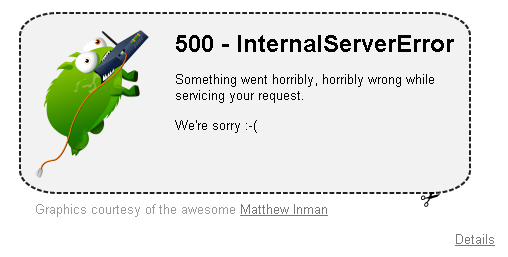
I do have one minor complaint though: it’s cutesy default error page…

Nancy default error page

I understand the motivation, and I can see how it helps with the “super-duper-happy-path”. But, when developing an API in a corporate environment, it’s frankly a bit embarrassing.

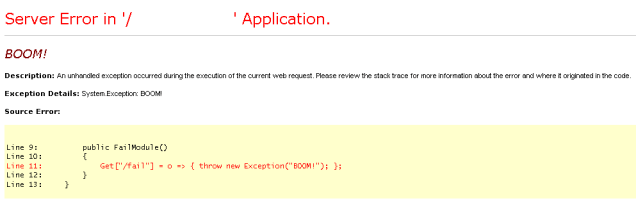
I want my YSOD back! The good news is, you can, with a little bit of work.

public class YsodErrorHandler : IErrorHandler
{
    public bool HandlesStatusCode(HttpStatusCode statusCode)
    {
        return statusCode == HttpStatusCode.InternalServerError;
    }

    public void Handle(HttpStatusCode statusCode, NancyContext context)
    {
        object errorObject;
        context.Items.TryGetValue(NancyEngine.ERROR_EXCEPTION, out errorObject);
        var exception = errorObject as Exception;

        if (exception != null)
        {
            throw exception;
        }
    }
}

Et voila!

YSOD

(Caveat: this will only work with 0.10.0, previous versions don’t provide the exception object). The best bit is, you don’t even have to register the error handler, Nancy will scan for it!

PowerShell equivalent of Capistrano’s “run”

Automating deployments using PowerShell & WinRM is, by turns, both awesome and deeply frustrating.

One of the main stumbling blocks, for me anyway, is which side of the machine boundary the code should be evaluated on.

When using Invoke-Command with a script block, any variables inside the block are evaluated remotely:

$foo = "foo"
Invoke-Command -ScriptBlock {
    Write-Host "Foo: $foo"
}

If you want to use a local variable on the remote machine, you need to force the evaluation earlier. I ended up with something inspired by Capistrano’s run action.

function run([string] $command, $session)
{
  $runBlock = [ScriptBlock]::Create($command)
  try
  {
    Invoke-Command -Session $session -ScriptBlock $runBlock -ErrorAction Stop
  }
  catch
  {
    $_.Exception
    exit 1
  }
}

$foo = "foo"
run "write-host `"Foo: $foo`""

Alternatively, you can pass the args to Invoke-Command explicitly:

Invoke-Command -Args $foo, $bar -Session $session -ErrorAction Stop -ScriptBlock {
  param($foo, $bar)
  
  Write-Host "Foo: $foo"
  Write-Host "Bar: $bar"
}

Testing async methods with MbUnit

XUnit 1.9 recently shipped, featuring support for async tests:

[Test]
public async Task MyAsyncUnitTest()
{
    // ... setup code here ...

    var result = await CallMyAsyncApi(...);

    // ... assertions here ...
}

Here’s how that looks using MbUnit:

public class AsyncTestAttribute : TestAttribute
{
	/// <inheritdoc />
	protected override void Execute(PatternTestInstanceState state)
	{
		var result = state.InvokeTestMethod();

		var task = result as Task;
		if (task != null)
			task.Wait();
	}
}

Sweet! This’ll be in the next MbUnit/Gallio release (but only if you also reference MbUnit40.dll).

Upgrading from Bootstrap 1.4.0 to 2.0

Twitter Bootstrap 2.0 was recently released. They’ve provided an upgrade guide, but it doesn’t list every detail you may have to change. Here’s a list of the things I had to update to get a similar look:

CSS

I added a reference to bootstrap-responsive.css. I’m not sure this really mattered for me, but you never know!

Nav bar

The navbar markup had changed a bit, from:

 <div id="navbar" class="topbar">
  <div class="fill">
	<div class="container">
	  <a class="brand" href="#">App name</a>
	  <ul class="nav">
          ...
          </ul>
	</div>
  </div>
</div>

to:

<div id="navbar" class="navbar navbar-fixed-top">
  <div class="navbar-inner">
	<div class="container">
	  <a class="brand" href="">App name</a>
	  <div class="nav-collapse">
		<ul class="nav">
                ...
		</ul>
	  </div><!--/.nav-collapse -->
	</div>
  </div>
</div>

Grid

The grid layout has changed, from 16 columns to 12.

Tables

.condensed-table is no more, you need .table & .table-condensed

Buttons

The button styles are now prepended with btn e.g. for a dangerous button:

<button class="btn btn-danger">Watch Out!</button>

Alerts

The script has been renamed to bootstrap-alert.js (from bootstrap-alerts.js). The css has changed a bit as well, from:

<div id="alert" class="alert-message error"></div>

to:

<div id="alert" class="alert alert-error"></div>

And the close button has changed from:

<a class="close" href="#">x</a>

to:

<a class="close" data-dismiss="alert">x</a>

(thanks to this article for the tip!).

And finally…

Forms

The default form styling has changed to a “stacked” look, and the required markup has changed as well. To get back to the old look, I had to go from this:

<form>
  <div class="clearfix">
    <label>This:</label>
    <div class="input">
      <input readonly="readonly" value="<%= model.this %>" />
    </div>
  </div>
  ...
  <div class="clearfix">
    <label>That:</label>
    <div class="input">
      <input readonly="readonly" value="<%= model.that %>" />
    </div>
  </div>
</form>

to:

<form class="form-horizontal">
  <fieldset class="control-group">
    <label class="control-label" for="this">This:</label>
    <div class="controls">
      <input readonly="readonly" value="<%= model.this %>" name="this" />
    </div>
  </fieldset>
  ...
  <fieldset class="control-group">
    <label class="control-label" for="that">That:</label>
    <div class="controls">
      <input readonly="readonly" value="<%= model.that %>" name="that" />
    </div>
  </fieldset>
</form>

I’m sure there are other changes, but that was enough for the subset I’m using.

Partial function application (in C#)

I often use delegates (e.g. Func<> or Action<>) to make code testable that would otherwise be using static methods. In this case, Trace.WriteLine:

public class TraceLogger : ILogger
{
	private readonly TraceSwitch _traceSwitch;
	private readonly string _category;
	private readonly Action<string, string> _write;

	public TraceLogger(TraceSwitch traceSwitch, string category, Action<string, string> write)
	{
		_traceSwitch = traceSwitch;
		_category = category;
		_write = write;
	}

	public void Debug(string message)
	{
		if (_traceSwitch.TraceVerbose)
			_write(message, _category);
	}

	public void Info(string message)
	{
		if (_traceSwitch.TraceInfo)
			_write(message, _category);
	}
	
	etc...
}

Every time the write action is called, the second argument is the same. So we can save ourselves some duplication by using partial function application (not currying, apparently!):

public class TraceLogger : ILogger
{
	private readonly TraceSwitch _traceSwitch;
	private readonly Action<string> _write;

	public TraceLogger(TraceSwitch traceSwitch, string category, Action<string, string> write)
	{
		_traceSwitch = traceSwitch;
		_write = m => write(m, category);
	}

	public void Debug(string message)
	{
		if (_traceSwitch.TraceVerbose)
			_write(message);
	}

	public void Info(string message)
	{
		if (_traceSwitch.TraceInfo)
			_write(message);
	}
	
	etc...
}

Source indexing with PowerShell (and TeamCity)

Source indexing is definitely a “best practice”, when developing libraries that will be referenced as binaries.

Getting it working as part of a CI build can be a bit fiddly though.

There are a few pre-requisites for the build agent:

  1. Perl (>= 5.6): Strawberry Perl portable, for example
  2. SrcSrv: Part of the Debugging Tools for Windows
  3. SVN: command line e.g. Win32SVN (zip install)

All the above tools can be xcopy installed, but feel free to use an msi.

To index your PDBs, you need to run svnindex. Using TeamCity, you can add a PowerShell build step (in our case, after build & test, and before NuGet packaging):

function srcIndex([string] $project)
{
  & svnindex.cmd /debug /source=$project /symbols="$project\bin"
}

write-host "Updating path"
$env:path = "$env:path;D:\perl\perl\site\bin;D:\perl\perl\bin;D:\perl\c\bin;D:\srcsrv;D:\svn\bin"
write-host "Path: $env:path"
$env:term = "dumb" #strawberry perl portable specific

srcIndex "%system.teamcity.build.checkoutDir%\src\MyProject"

We start by updating the path, to include the location of the necessary exes (you can skip this if you used an installer for the pre-reqs). We then point svnindex at the source, and symbols.

If you want to index all your projects, you can loop over them:

gci "%system.teamcity.build.checkoutDir%\src" -r -i *.csproj | foreach { srcIndex $_.fullname }

The working dir for the build step needs to be the drive root e.g. D:\, as the indexing scripts don’t like relative paths (and you’ll see the dreaded “… zero source files found …”).

Then you just need to enable Source Server support in Visual Studio (uncheck “Just my code”), and luxuriate in full source debugging!

EDIT: Make sure the VCS root is set to checkout on the agent, not the server, as the information required is in the SVN repo.

Using Bootstrap with Backbone (Part 2)

In Part 1 we looked at using Backbone alerts. This time, the navbar!

It would be very simple (and not very useful), to create a Backbone View that renders a static navbar.

But we want a modular, composable app; where each section of the application can add it’s own menu items.

We can start with a template:

<div class="fill">
  <div class="container">
    <a class="brand" href="#">MyApp</a>
    <ul class="nav">
      <% _.each(links, function(link) { %>
        <li><a href="<%= link.url %>"><%= link.name %></a></li>
      <% }); %>
    </ul>
  </div>
</div>

Obviously our model will consist of a collection of links:

(function($) {
  var Link = Backbone.Model.extend();

  var LinksCollection = Backbone.Collection.extend({
    model: Link
  });
  
  var NavBarView = Backbone.View.extend({
    el: $('#navbar'),
    render: function(eventName) {
      var self = this;
      $.get("templates/navbar/navbar.htm", function(data) {
        $(self.el).html(_.template(data)({ links: self.model.toJSON() }));
      });
      return this;
    },
    addLink: function(link) {
      this.model.add(link);
    }
  });

  app.navbar = new NavBarView({ model: new LinksCollection() });
  
})(jQuery);

Populated by other modules:

(function() {
  ...
  app.navbar.addLink({ url: "#something", name: "Something" });
})();