Fetch tags when cloning repo

I recently moved a freestyle Jenkins job to (multibranch) pipeline, and discovered that there was a subtle change in behaviour in the checkout being made. Before:

git fetch --tags --force --progress -- git@github.com:*** +refs/heads/*:refs/remotes/origin/* # timeout=10

And after:

git fetch --no-tags --force --progress -- https://github.com/*** +refs/heads/master:refs/remotes/origin/master # timeout=10

The important difference here being the --no-tags. This is probably a sensible default for most use cases (i.e. a faster clone), but this job was using semantic-release; which needs the tags.

It’s relatively simple to fix this in the ui, you can add an “advanced clone behaviours” block, and tick a box:

But this job is created using the Job DSL, and I couldn’t see any easy way to add that to the branchSource. In the end, I changed the checkout step from:

stage('Checkout') {
            steps {
                checkout scm
            }
}

to:

checkout scmGit(
                    branches: scm.branches,
                    extensions: [cloneOption(noTags: false, reference: '', shallow: false)],
                    userRemoteConfigs: scm.userRemoteConfigs
                )

Waiting for next available executor…

We are using a multibranch pipeline, that itself spawns child jobs, to execute 100s (or 1000s) of tasks on Fargate. In general, this works surprisingly well, but we have been seeing occasional “stuck” builds that need to be aborted.

In the build logs, it just says:

Obtained Jenkinsfile from git git@github.com:***
[Pipeline] Start of Pipeline
[Pipeline] node
Still waiting to schedule task
Waiting for next available executor...
Aborted by ***

And from the controller logs:

10:43:28 [id=77]#011INFO#011c.c.j.plugins.amazonecs.ECSCloud#provision: Will provision frontend-builds-swarm-xl-frontend-builds-swarm-xl-jzkv3, for label: frontend-builds-swarm-xl
10:43:38 [id=386]#011INFO#011hudson.slaves.NodeProvisioner#update: frontend-builds-swarm-xl-frontend-builds-swarm-xl-jzkv3 provisioning successfully completed. We have now 195 computer(s)
10:43:39 [id=844559]#011INFO#011c.c.j.p.amazonecs.ECSLauncher#runECSTask: [frontend-builds-swarm-xl-frontend-builds-swarm-xl-jzkv3]: Starting agent with task definition arn:aws:ecs:eu-west-2:***:task-definition/frontend-builds-swarm-xl-ecs:1}
10:43:39 [id=844559]#011INFO#011c.c.j.p.amazonecs.ECSLauncher#runECSTask: [frontend-builds-swarm-xl-frontend-builds-swarm-xl-jzkv3]: Agent started with task arn : arn:aws:ecs:eu-west-2:***:task/frontend-builds/0d265f1fa5d747f0a0d9133986004535
10:43:39 [id=844559]#011INFO#011c.c.j.p.amazonecs.ECSLauncher#launchECSTask: [frontend-builds-swarm-xl-frontend-builds-swarm-xl-jzkv3]: TaskArn: arn:aws:ecs:eu-west-2:***:task/frontend-builds/0d265f1fa5d747f0a0d9133986004535
10:43:39 [id=844559]#011INFO#011c.c.j.p.amazonecs.ECSLauncher#launchECSTask: [frontend-builds-swarm-xl-frontend-builds-swarm-xl-jzkv3]: TaskDefinitionArn: arn:aws:ecs:eu-west-2:***:task-definition/frontend-builds-swarm-xl-ecs:1
10:43:39 [id=844559]#011INFO#011c.c.j.p.amazonecs.ECSLauncher#launchECSTask: [frontend-builds-swarm-xl-frontend-builds-swarm-xl-jzkv3]: ClusterArn: arn:aws:ecs:eu-west-2:***:cluster/frontend-builds
10:43:39 [id=844559]#011INFO#011c.c.j.p.amazonecs.ECSLauncher#launchECSTask: [frontend-builds-swarm-xl-frontend-builds-swarm-xl-jzkv3]: ContainerInstanceArn: null
10:48:39 [id=844559]#011INFO#011c.c.j.p.amazonecs.ECSLauncher#launchECSTask: [frontend-builds-swarm-xl-frontend-builds-swarm-xl-jzkv3]: Task started, waiting for agent to become online
10:48:39 [id=844559]#011INFO#011c.c.j.p.amazonecs.ECSLauncher#waitForAgent: [frontend-builds-swarm-xl-frontend-builds-swarm-xl-jzkv3]: Agent connected
10:48:40 [id=843810]#011INFO#011c.c.j.plugins.amazonecs.ECSSlave#_terminate: [frontend-builds-swarm-xl-frontend-builds-swarm-xl-jzkv3]: Stopping: TaskArn arn:aws:ecs:eu-west-2:***:task/frontend-builds/0d265f1fa5d747f0a0d9133986004535, ClusterArn arn:aws:ecs:eu-west-2:***:cluster/frontend-builds
10:48:40 [id=844705]#011INFO#011j.s.DefaultJnlpSlaveReceiver#channelClosed: Computer.threadPoolForRemoting [#45658] for frontend-builds-swarm-xl-frontend-builds-swarm-xl-jzkv3 terminated: java.nio.channels.ClosedChannelException
10:48:40 [id=844867]#011WARNING#011hudson.model.Executor#resetWorkUnit: Executor #0 for frontend-builds-swarm-xl-frontend-builds-swarm-xl-jzkv3 grabbed hudson.model.queue.WorkUnit@272c14ff[work=part of ...-master » master #208] from queue but frontend-builds-swarm-xl-frontend-builds-swarm-xl-jzkv3 went off-line before the task's worker thread was ready to execute. Termination trace follows:

That looks like the agent was shot in the head, after the 5m timeout we have set up for that cloud:

  clouds:
    - ecs:
        ...
        numExecutors: 1
        maxAgents: 100
        retentionTimeout: 5
        retainAgents: false
        taskPollingIntervalInSeconds: 300
        slaveTimeoutInSeconds: 300

However the agent logs (from cloudwatch, using the task arn):

May 10, 2023 10:44:56 AM hudson.remoting.jnlp.Main createEngine
INFO: Setting up agent: frontend-builds-swarm-xl-frontend-builds-swarm-xl-jzkv3
May 10, 2023 10:44:56 AM hudson.remoting.Engine startEngine
INFO: Using Remoting version: 3107.v665000b_51092
May 10, 2023 10:44:56 AM hudson.remoting.Engine startEngine
WARNING: No Working Directory. Using the legacy JAR Cache location: /home/jenkins/.jenkins/cache/jars
May 10, 2023 10:44:56 AM hudson.remoting.jnlp.Main$CuiListener status
INFO: Locating server among [https://frontend-jenkins.gamevy.com/]
May 10, 2023 10:44:57 AM org.jenkinsci.remoting.engine.JnlpAgentEndpointResolver resolve
INFO: Remoting server accepts the following protocols: [JNLP4-connect, Ping]
May 10, 2023 10:44:57 AM hudson.remoting.jnlp.Main$CuiListener status
INFO: Agent discovery successful
  Agent address: ***
  Agent port:    5000
  Identity:      1a:11:35:a1:0d:37:04:bc:9b:e9:f4:18:35:0f:0c:5d
May 10, 2023 10:44:57 AM hudson.remoting.jnlp.Main$CuiListener status
INFO: Handshaking
May 10, 2023 10:44:57 AM hudson.remoting.jnlp.Main$CuiListener status
INFO: Connecting to frontend-jenkins.gamevy.com:5000
May 10, 2023 10:44:57 AM hudson.remoting.jnlp.Main$CuiListener status
INFO: Trying protocol: JNLP4-connect
May 10, 2023 10:44:57 AM org.jenkinsci.remoting.protocol.impl.BIONetworkLayer$Reader run 
INFO: Waiting for ProtocolStack to start.
May 10, 2023 10:44:57 AM hudson.remoting.jnlp.Main$CuiListener status
INFO: Remote identity confirmed: 1a:11:35:a1:0d:37:04:bc:9b:e9:f4:18:35:0f:0c:5d
May 10, 2023 10:44:57 AM hudson.remoting.jnlp.Main$CuiListener status
INFO: Connected
May 10, 2023 10:48:40 AM hudson.remoting.jnlp.Main$CuiListener status
INFO: Terminated

suggest that the agent had connected, successfully, several minutes earlier.

A bit of code spelunking revealed that even though the plugin spinwaits once a second, for the agent to connect; it doesn’t actually start that process, until it thinks the task has started. And we had, somewhat foolishly, set the polling interval to the same value as the timeout (after a few freezes, we think caused by AWS rate limiting).

Having reduced the polling interval to 2m30s, the problem seems to be resolved! 🤞

Script approval hashes

If you administer a Jenkins instance, you may be used to approving script usage. In theory, it is possible to turn the check off, but even behind an auth gateway, that may not be a good idea.

In the before time, best practice was to click the button under “manage jenkins”:

But in a brave new CasC world, it is possible to instead provide a list of pre-approved scripts:

security:
  scriptApproval:
    approvedScriptHashes:
      - 046256fc8829d7af680424b819da55bdb7c660f4 # jobs-dsl/foo.groovy
     ...

However maintaining this list is obviously a nightmare. First of all, you’d think it would be as simple as running:

shasum foo.groovy

But that doesn’t give the “right” answer. Eventually a colleague of mine worked out that you need to prepend a magic string:

(printf "groovy:" && cat foo.groovy) | shasum

With that in hand, you still need to run that over e.g. every Job DSL script you have. And ideally remove old hashes, when the file changes. Behold my glory!

$ find -maxdepth 1 -name "*.groovy" | sort | xargs -I {} sh -c 'HASH=`(printf "groovy:" && cat {}) | shasum | awk '"'"'{print $1}'"'"'`; echo - $HASH \# jobs-dsl/{}'
- 98a015976c7392bde86f3e35d526054b684f605f # jobs-dsl/./foo.groovy
...

I didn’t think I could hate the shell more than I already did.

You should then be able to paste the output of this script into the CasC yaml, and get a reasonable diff (although it turns out that the osx & linux sort commands disagree on which special chars should go first).

Jenkins Host Key Verification Configuration

Known hosts & SSH is always a pain, but just turning it off never seems like a good idea (even if it has probably never failed for the right reason).

In the past, we have used ssh-keyscan when setting up a Jenkins instance, but another option is to set the host key verification configuration to “Accept first connection”:

Automatically adds host keys to the known_hosts file if the host has not been seen before, and does not allow connections to previously-seen hosts with modified keys.

This is what most people do locally, when prompted.

Our shiny new Jenkins instance is supposed to only be configured by CasC though, and I couldn’t work out what the yaml would look like (the plugin docs have since been updated).

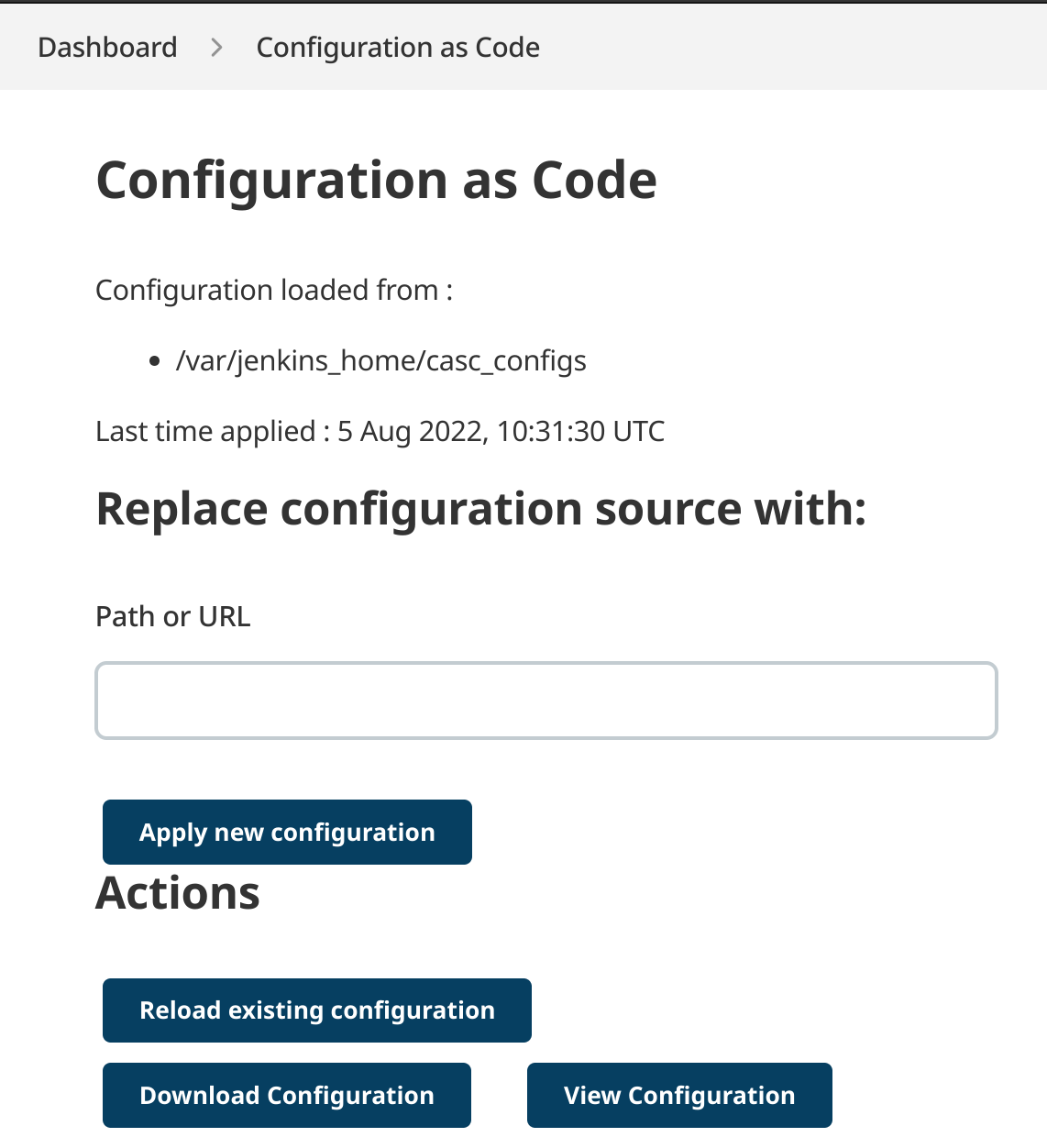
It turns out that there is a very handy “view configuration” button:

allowing you to make changes in the UI, and then check the generated config:

The future is bright indeed.

Jenkins seed job

In the brave new world of Jenkins as Code, you can use CasC to specify an initial job (using the Job DSL):

jobs:
  - script: >
      pipelineJob('jenkins-job-dsl') {
        definition {
          cpsScm{
            scm {
              gitSCM {
                userRemoteConfigs {
                  browser {
                    githubWeb {
                      repoUrl('https://github.com/foo/bar')
                    }
                  }
                  gitTool("github")
                  userRemoteConfig {
                    credentialsId("github-creds")
                    name("")
                    refspec("")
                    url("git@github.com:foo/bar.git")
                  }
                }
                branches {
                  branchSpec { name("main") }
                }
              }
            }
            scriptPath("Jenkinsfile.seed")
          }
        }
        properties {
          pipelineTriggers {
            triggers {
              cron { spec('@daily') }
              githubPush()
            }
          }
        }
      }

using a Jenkinsfile to again call the Job DSL:

pipeline {
    agent any

    options {
        timestamps ()
        disableConcurrentBuilds()
    }

    stages {
        stage('Clean') {
            steps {
                deleteDir()
            }
        }

        stage('Checkout') {
            steps {
                checkout scm
            }
        }

        stage('Job DSL') {
            steps {
                jobDsl(
                    targets: """
                        jobs/*.groovy
                        views/*.groovy
                    """
                )
            }
        }
    }
}

and create all the jobs/views from that repo (each of which is another Jenkinsfile).

This should allow you to recreate your Jenkins instance, without any manual fiddling; and provide an audit trail of any changes.

Jenkins as Code

Jenkins has come a long way, in the past few years. You can now run it as a docker image:

docker run --rm -p 8080:8080 -p 50000:50000 -v jenkins_home:/var/jenkins_home --name jenkins jenkins/jenkins:lts-jdk11

Or bake your own image, to pre-install plugins:

FROM jenkins/jenkins:lts-jdk11

COPY --chown=jenkins:jenkins plugins.txt /usr/share/jenkins/ref/plugins.txt
RUN jenkins-plugin-cli -f /usr/share/jenkins/ref/plugins.txt

providing a list of plugins

antisamy-markup-formatter:latest
build-discarder:latest
configuration-as-code:latest
copyartifact:latest
credentials-binding:latest
envinject:latest
ghprb:latest
git:latest
github:latest
job-dsl:latest
matrix-auth:latest
nodejs:latest
timestamper:latest
workflow-aggregator:latest
ws-cleanup:latest

and now you can even configure those plugins using CasC:

docker run --rm -p 8080:8080 -p 50000:50000 -v jenkins_home:/var/jenkins_home -e CASC_JENKINS_CONFIG=/var/jenkins_home/casc_configs -v $PWD/casc_configs:/var/jenkins_home/casc_configs --name jenkins my-jenkins

Jobs that create jobs

Over the last few years, there has been a push for more “* as code” with Jenkins configuration. You can now specify job config using a Jenkinsfile, allowing auditing and code reviews, as well as a backup.

Combined with the Job DSL plugin, this makes it possible to create a seed job (using another Jenkinsfile, naturally) that creates all the jobs for a specific project.

pipeline {
    agent any

    options {
        timestamps ()
    }

    stages {
        stage('Clean') {
            steps {
                deleteDir()
            }
        }

        stage('Checkout') {
            steps {
                checkout scm
            }
        }

        stage('Job DSL') {
            steps {
                jobDsl targets: ['jobs/*.groovy', 'views/*.groovy'].join('\n')
            }
        }
    }
}

This will run all the groovy scripts in the jobs & views folders in this repo (once you’ve approved them).

For example:

pipelineJob("foo-main") {
    definition {
        cpsScm{
            scm {
                git {
                    remote {
                        github("examplecorp/foo", "ssh")
                    }
                    branch("main")
                }
            }
            scriptPath("Jenkinsfile")
        }
    }
    properties {
        githubProjectUrl('https://github.com/examplecorp/foo')
        pipelineTriggers {
            triggers {
                cron {
                     spec('@daily')
                }
                githubPush()
            }
        }
    }
}

And a view, to put it in:

listView('foo') {
    description('')

    jobs {
        regex('foo-.*')
    }

    columns {
        status()
        weather()
        name()
        lastSuccess()
        lastFailure()
        lastDuration()
        buildButton()
    }
}

Jenkins and oauth2_proxy

We hide Jenkins behind bitly’s oauth2_proxy, to control access using our Google accounts. After recently upgrading to Debian Jessie (amongst other things), we found that enabling security on Jenkins (using the Reverse Proxy Auth plugin) resulted in an error:

java.lang.NullPointerException
	at org.jenkinsci.plugins.reverse_proxy_auth.ReverseProxySecurityRealm$1.doFilter(ReverseProxySecurityRealm.java:435)
	at hudson.security.HudsonFilter.doFilter(HudsonFilter.java:171)
	at org.eclipse.jetty.servlet.ServletHandler$CachedChain.doFilter(ServletHandler.java:1482)
	at org.kohsuke.stapler.compression.CompressionFilter.doFilter(CompressionFilter.java:49)
	at org.eclipse.jetty.servlet.ServletHandler$CachedChain.doFilter(ServletHandler.java:1482)
...

Following the stack trace, we find ourselves here. It’s pretty obvious that the NRE is caused by u being null, but the real question is why we are in that if block at all.

It turns out that at some point the oauth proxy started sending a basic auth header, as well as the X-Forwarded ones we need. This makes the Jenkins plugin sad, when it tries to look up the user.

Unfortunately, there is currently no way to have one without the other, which is an issue for other upstream applications. Hopefully at some point that flag will be added, but until then I’ve simply deleted the offending line.

Jenkins + SSH keys

Jenkins makes it very easy to manage SSH keys. You can use the Credentials plugin to store the key, and then the SSH Agent plugin to seamlessly expose it to your build.

The downside is that now everyone with access to Jenkins has access to that key. It’s possible to use roles to restrict access through the web UI, but in our case it’s useful to allow access to the machine Jenkins is running on (for debugging purposes). And Jenkins itself has r+w privileges, so it’s all but impossible to prevent reading that file.

When the key is used for deploying to production, that’s a problem. Access to the key itself is actually useless, as it’s passphrase protected, but using the solution described above means the passphrase is stored in a credentials.xml file in $JENKINS_HOME. The file is encrypted, but reversing that is trivial.

It would be handy if the SSH Agent plugin allowed prompting for the passphrase before running a build, but that doesn’t appear to be a thing. It is possible however, to use the Parameterized Build plugin to emulate that.

This means you need to start ssh-agent yourself, and due to the fact that ssh-add doesn’t play nice with stdin, there’s some hoop jumping involved. The easiest method seems to involve using expect:

#!/bin/bash

expect << EOF
  spawn ssh-add $1
  expect "Enter passphrase"
  send "$SSH_PASSPHRASE\r"
  expect eof
EOF

Then, assuming you added a build parameter named SSH_PASSPHRASE, you can use this script after launching ssh-agent and before you need the ssh key:

eval `ssh-agent`
./ssh-add-pass ./key_file
./run_playbook